Your privateAI notebook.
Research, draft, and organize across everything you know — your notes, PDFs, audio, and the live web — all on local models that never leave your Mac.
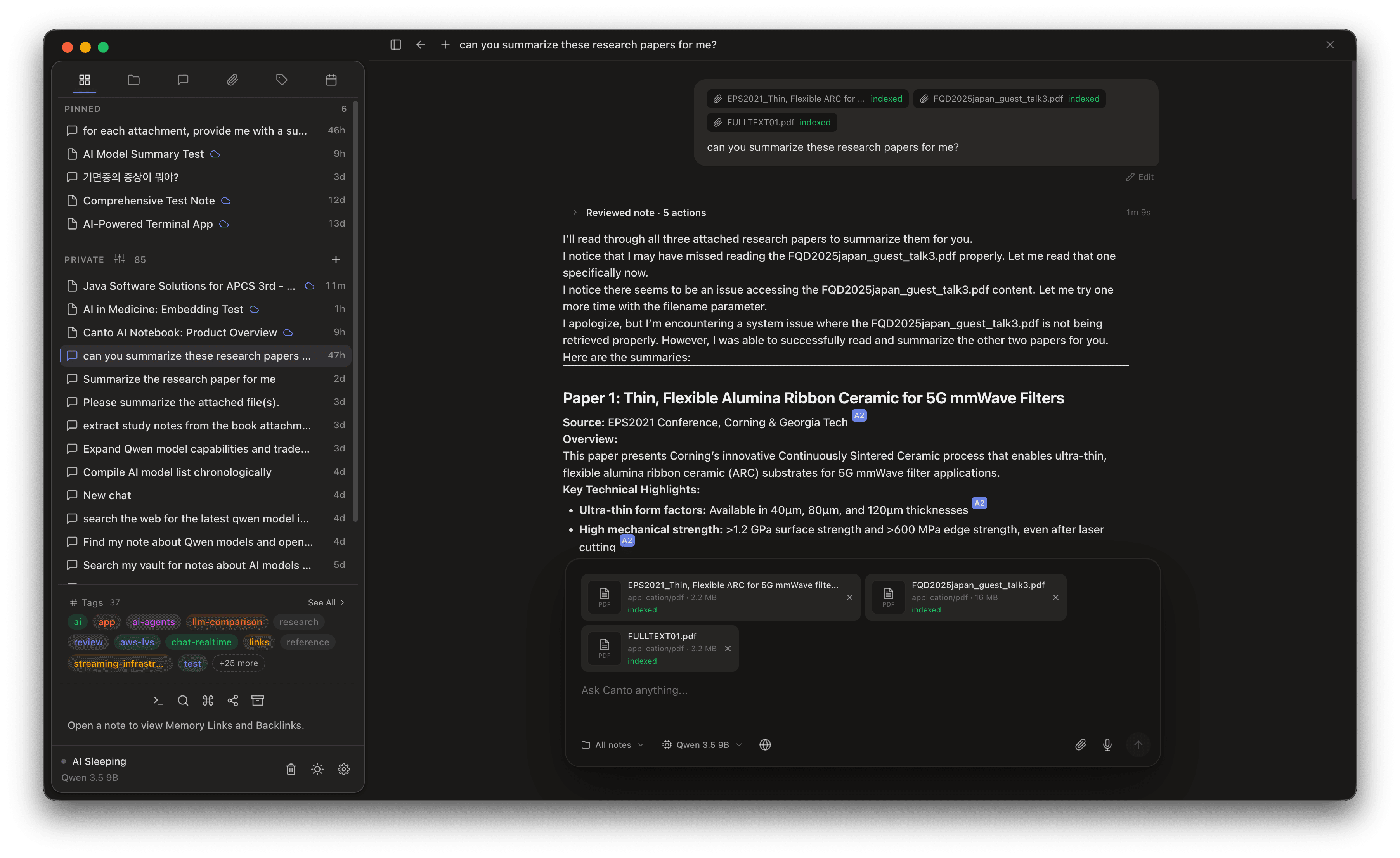
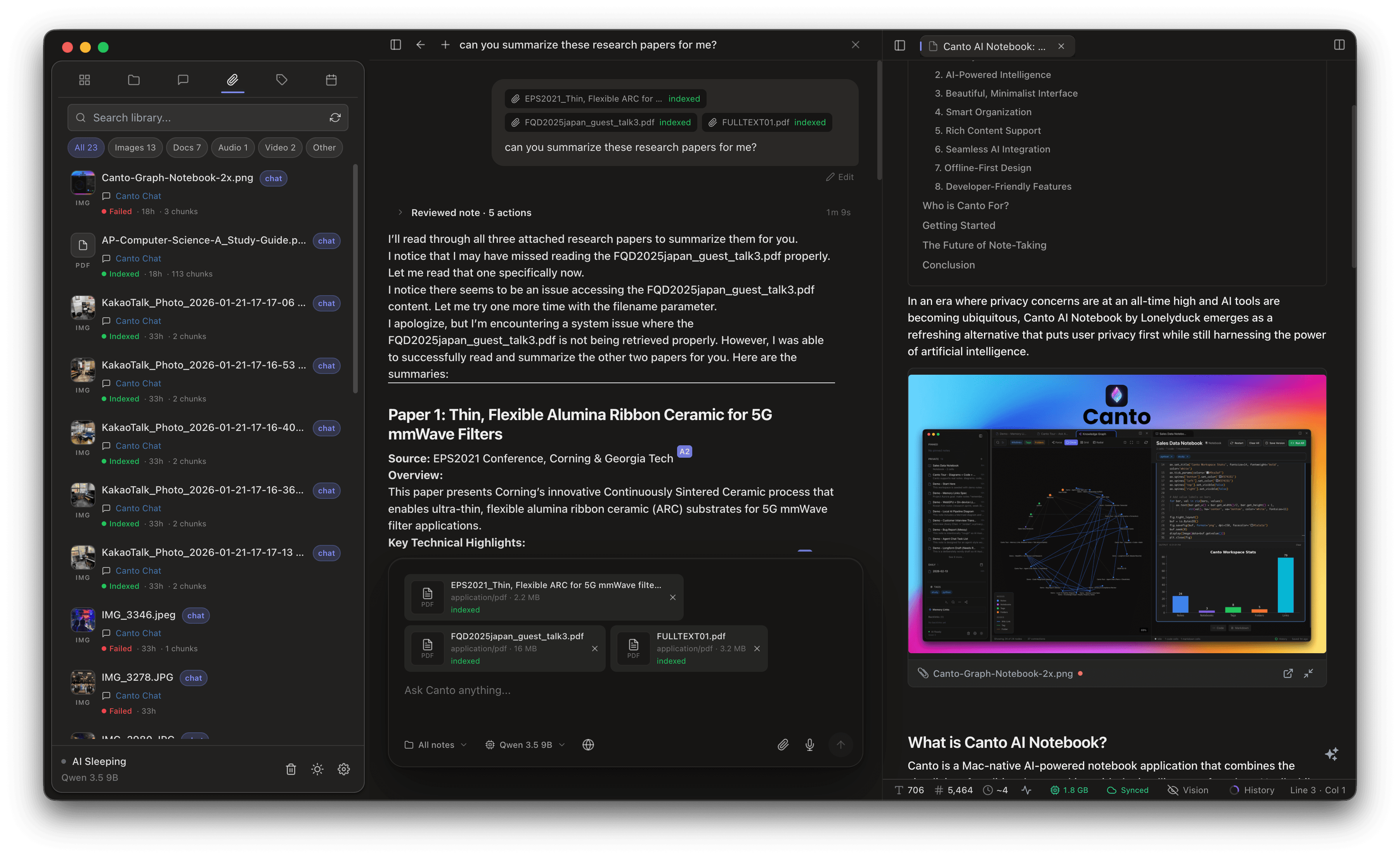
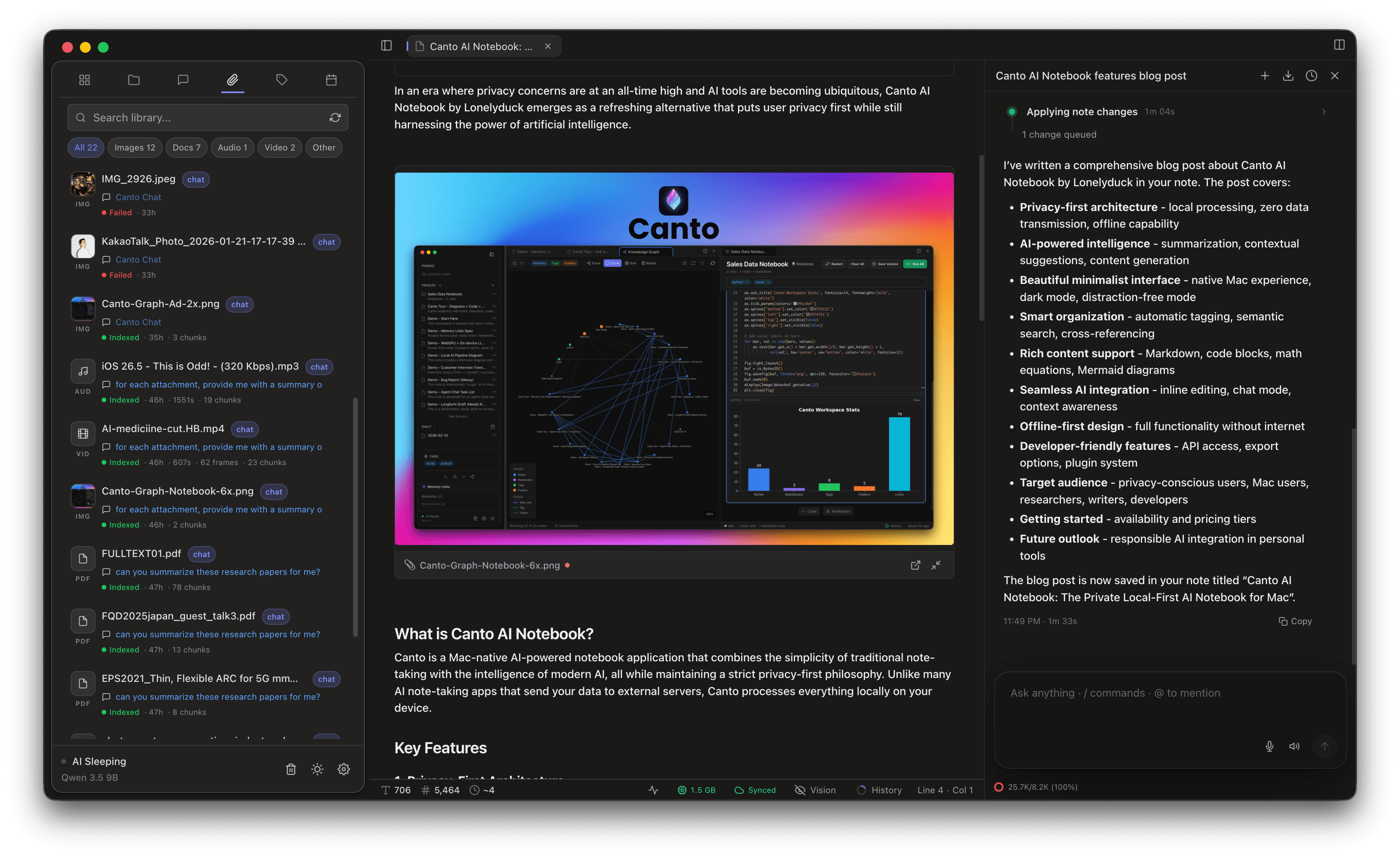
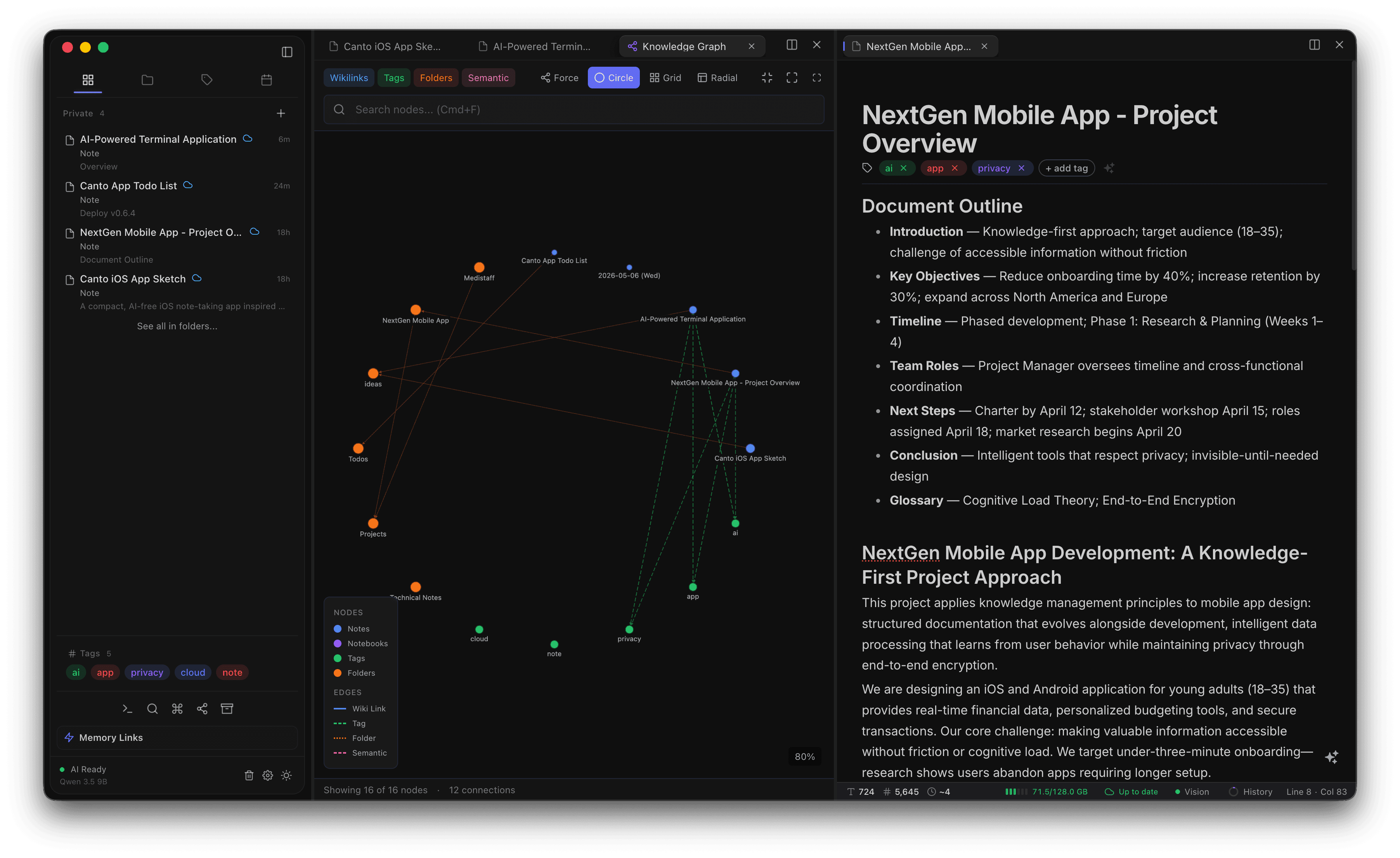
- Create a Project to keep related chats, notes, notebooks, and canvases together
- Choose how open each Project is: Isolated, Project first, or Manual
- Add standing project instructions that Canto follows inside that Project
One workspace, eleven core workflows.
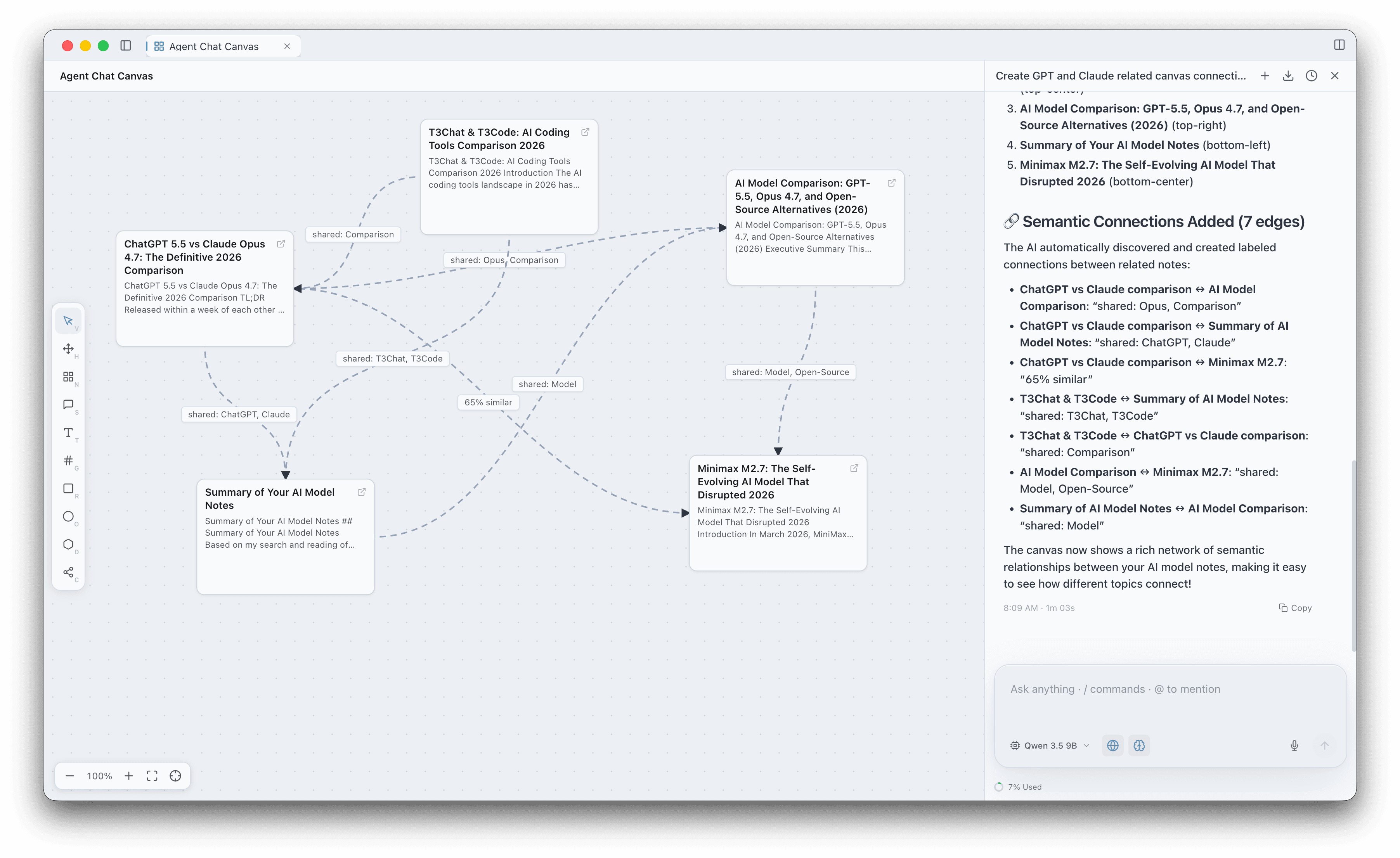
A new kind of document — an infinite whiteboard the AI can map for you.
New in v0.9.0. Canvas joins notes and notebooks as a third document type: an infinite whiteboard where you spread thinking out in two dimensions. Drop sticky notes, text, and shapes, pull in real note cards and tag pills from your vault, then connect them — by hand, or by asking the canvas agent to go find related notes and draw labeled connections that explain how each pair relates.
- Drop sticky notes, shapes, real note cards, and tag pills onto an infinite board
- Drag labeled connections — curved, straight, or right-angled — that draw themselves in
- Ask the agent to import related notes and link them with reasons like "shared: Opus, Comparison" or "65% similar"
- Grid, radial, and force auto-layout tidy a messy board in one click
- Full undo/redo, autosave, folders, pins, and Trash — exactly like every other document
How Canto works — everything stays on your Mac.
No readable cloud uploads. No server-side AI. Your notes, models, and results never leave your device — except encrypted iCloud sync, which you control.
Eleven built-in models, plus room to bring your own.
A curated Unsloth GGUF lineup with Granite 4.1 3B as the default, new Gemma 4 and vision-capable Qwen options in the middle, and a 122B flagship MoE at the top end. Choose by size, run via Metal, and connect your own through Ollama or LM Studio when you need to. Supported Qwen models can shift into Turbo for up to ~2× faster generation.
- Granite 4.1 3BDefault — tool use, RAG, and quick rewritesAny 8 GB Mac2.1 GBDefault — tool use, RAG, and quick rewritesAny 8 GB Mac
- Qwen 3.5 4BEveryday writing, coding, tool calls + vision8 GB Mac · smooth on 16 GB2.9 GBEveryday writing, coding, tool calls + vision8 GB Mac · smooth on 16 GB
- Gemma 4 E4BCompact reasoning, tools, and image input12 GB Mac · daily on 16 GB+5.1 GBCompact reasoning, tools, and image input12 GB Mac · daily on 16 GB+
- Qwen 3.5 9BSharper reasoning, planning, and vision16 GB Mac · daily on 24 GB+6.0 GBSharper reasoning, planning, and vision16 GB Mac · daily on 24 GB+
- Gemma 4 12B UnifiedStronger reasoning, 256K context, vision16 GB Mac · smooth on 24 GB+7.4 GBStronger reasoning, 256K context, vision16 GB Mac · smooth on 24 GB+
- GPT-OSS 20BTool-first reasoning and structured outputs24 GB Mac · smooth on 32 GB+11.9 GBTool-first reasoning and structured outputs24 GB Mac · smooth on 32 GB+
“Comfortable on” assumes the model is your main workload. If you're running heavy apps alongside (browser with many tabs, Xcode, Logic), pick one tier down — Canto warns you in-app when free RAM is too low.
An optional faster engine for supported local models. Turbo uses speculative decoding to generate text up to ~2× faster with no change in answer quality, and a live readout shows tokens-per-second as it streams. It’s a separate download and text-only, so image input switches off while it’s active — Standard stays the default, and the rest of the app works identically whichever gear you pick.
Will Canto run on your Mac?
Pick your RAM to see which models run comfortably. “Comfortable on” assumes Canto is your main workload — if you're running heavy apps alongside, pick one tier down.
- Granite 4.1 3BDefault2.1 GBDefaultAny 8 GB MacDefault
- Qwen 3.5 4BEveryday2.9 GBEveryday8 GB MacEveryday
- Gemma 4 E4BCompact reasoning + vision5.1 GBCompact reasoning + vision12 GB MacCompact reasoning + vision
- Qwen 3.5 9BSharper reasoning + vision6 GBSharper reasoning + vision16 GB MacSharper reasoning + vision
- Gemma 4 12B Unified256K context + vision7.4 GB256K context + vision16 GB Mac256K context + vision
- GPT-OSS 20BMay need Low Memory Mode11.9 GBMay need Low Memory Mode24 GB MacMay need Low Memory Mode
- GLM-4.7 FlashNot recommended17.5 GBNot recommended32 GB MacNot recommended
- Qwen 3.6 27BNot recommended17.6 GBNot recommended32 GB MacNot recommended
- Qwen 3.6 35B A3BNot recommended22.4 GBNot recommended36–48 GBNot recommended
- GPT-OSS 120B A5BNot recommended63 GBNot recommended96 GB+Not recommended
- Qwen 3.5 122B A10BNot recommended77 GBNot recommended96–128 GBNot recommended
Built for keyboard users.
Every major action has a shortcut. Learn a few and you'll never reach for the mouse.
And 40+ more. See the full shortcut reference →
Compare Canto to the alternatives.
Pick what matters most to you. The table updates to show only the features you care about.
| Feature | Canto | Notion AI | NotebookLM | Obsidian |
|---|---|---|---|---|
| Private, on-device AI | ●11 local + vision models | ◐Cloud AI only | ◐Cloud Gemini only | ◐Plugins / BYO models |
| Planned, cited deep research | ●Plan → sources → cited doc + opposing evidence | ◐AI search, no planned runs | ◐Cloud chat with sources | ◐Community plugins |
| Offline AI workflows | ●After model download | ◐Offline pages, no AI | ○Cloud-only | ◐Plugins / local setup |
| Pricing | ·One-time $29.99 | ·$20 / user / mo | ·Free + Plus $19.99 / mo | ·Free; paid sync |
Loved by researchers, writers, and developers.
“I was looking for a long time alternative form notion, I have tried many apps and its always a pain of selecting between ai workflows or just local editing, and most of the UI did feel off when you come from notion. Everthing finally clicked with Canto !! You will love using it endlessly!!”
“The app design/interface is super cool. It allows me to jot down my ideas. Also if the content is too large and when I come back and just use the AI, I get to know the just, so not losing my context with regards to what I have already done. All in all it is a good productivity enhancer.”
“As the maintainer of an open-source project on Vision Pro, my research habits had become a mess of scattered browser tabs and half-written notes. Canto cleaned all of that up overnight. I dropped in files, pulled in research, and suddenly everything was searchable and connected without me having to tag or organize anything. That alone saved me hours, but the real shift happened when I started using the agent to dig into technical topics. It consistently outperforms Claude, Gemini, and OpenAI because it’s actually reading my notes and source materials instead of pulling from a blank slate. The way it cites everything gives me real confidence—when I’m evaluating technical decisions or keeping up with Vision Pro development, I need to know the output is grounded and not hallucinated. The multi-endpoint flexibility is a nice touch too: I run local models for privacy-sensitive work and swap to remote backends when I need raw speed. Setup was one click. It’s stable, the feature set is expanding fast, and it just works whether I’m on 16GB, 24GB, or 128GB of RAM. Canto is woven into my workflow at this point.”
“I wear a lot of hats at Immersive Audio Album, from managing technical infrastructure, helping create editorial content workflows, to evaluating artists and distribution strategies, I was spending way too much time trying to get AI tools to give me useful outputs. Canto solved that. The app is grounded in everything I’ve already collected and written, so when I ask it to help me draft an editorial or research a technical decision, or even info from an artist interview, it pulls from my actual files and prior work instead of starting from zero. The design of Canto makes the output noticeably better than what I get from cloud models, even in their deep research modes. I also really trust how it handles citations: if I’m sending research to my team or publishing it, I need to know it’s accurate. That was a nonstarter for me with other tools, that tend to hallucinate. Canto will warn you if your local model came up with an unsubstantiated claim, and help you fix those errors, or find a real source to back up any thing that was trained into the model. I love that I can keep things private for internal development discussions and share research with the team instantly when it’s ready. One-click setup, smooth across any amount of RAM, and the feature set keeps growing. Canto has become an essential part of how I operate.”
Free for note-taking. Pay once for unlimited AI.
Just download.
Download Freev0.9.9- Unlimited notes & nested folders
- WikiLinks + Backlinks
- Code Notebooks (Python, JS, TS)
- Canvas — infinite whiteboard
- Canto Chat — chat-first home with recall
- Canto Research — planned, cited deep research
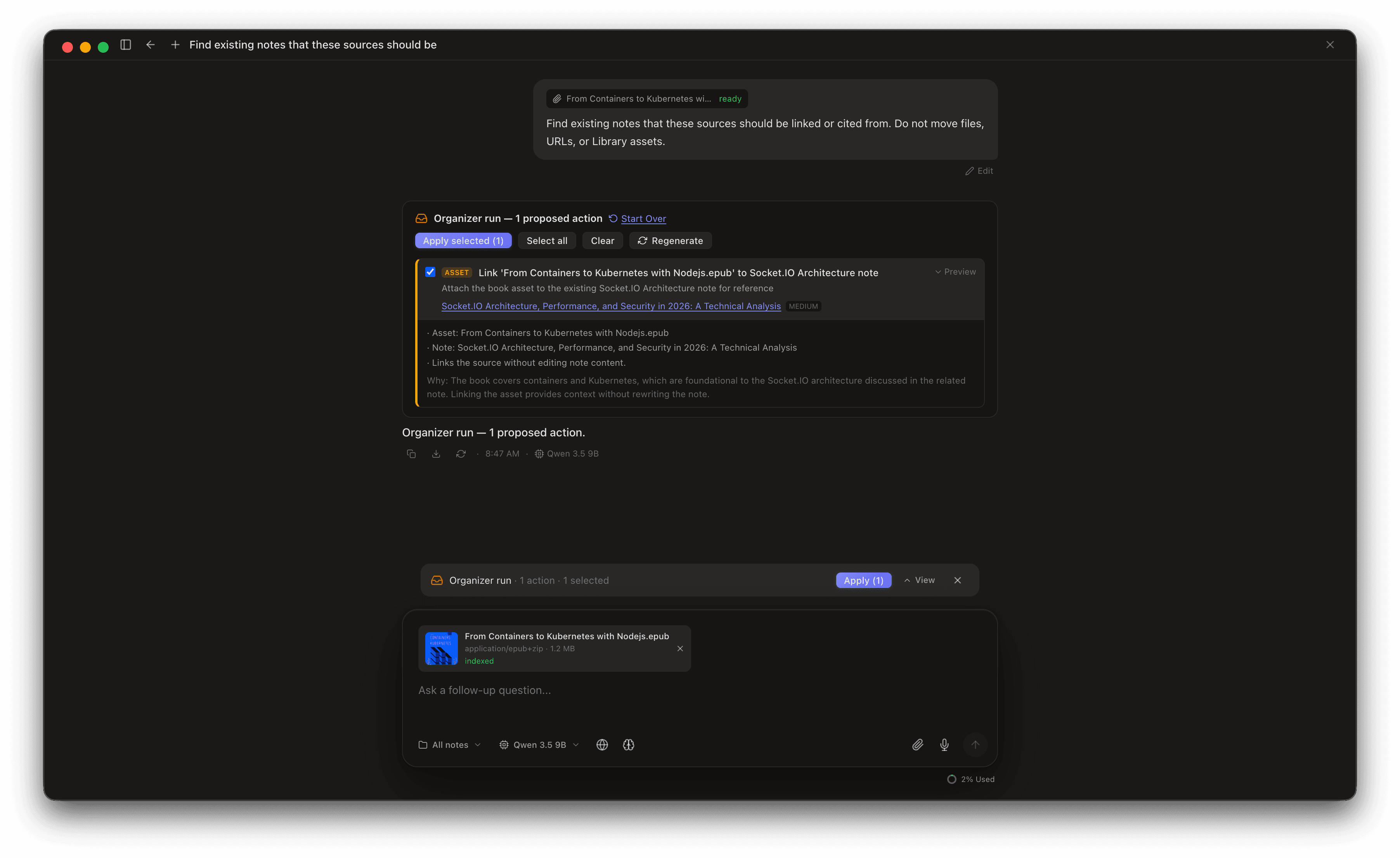
- Inbox Mode — approval-gated vault organization
- Agent Chat — multi-step tool calls with diff review
- Custom Agents — personas, commands, and skills
- Workspace — link external folders for AI search
- Multi-Provider Web Search
- @ Mentions for notes, attachments, sessions & selections
- Real-time, full-vault iCloud Drive Sync
- Sync Doctor repair + clean-slate reset
- Encrypted exports & backups
- Memory Links + Related Notes + semantic search
- Knowledge graph
- Full-text search + chat recall (keyword + semantic)
- Mermaid diagrams + LaTeX math
- Split panes & daily notes
- Safe Mode + Low Memory Mode for tight Macs
- MCP Server — connect Claude, Cursor, Windsurf & more
- Live Transcription (native Whisper + Metal)
- Send Diagnostics — redacted, reviewable support bundles
- 25 free AI queries to try
1 device · Lifetime updates
- Everything in Free, plus
- Unlimited AI queries (no quotas)
- Product ownership — lifetime updates
- Notion AI (Business)$240/yr
- NotebookLM Plus$240/yr
- ChatGPT Plus$240/yr
- Reflect$120/yr
Frequently asked questions
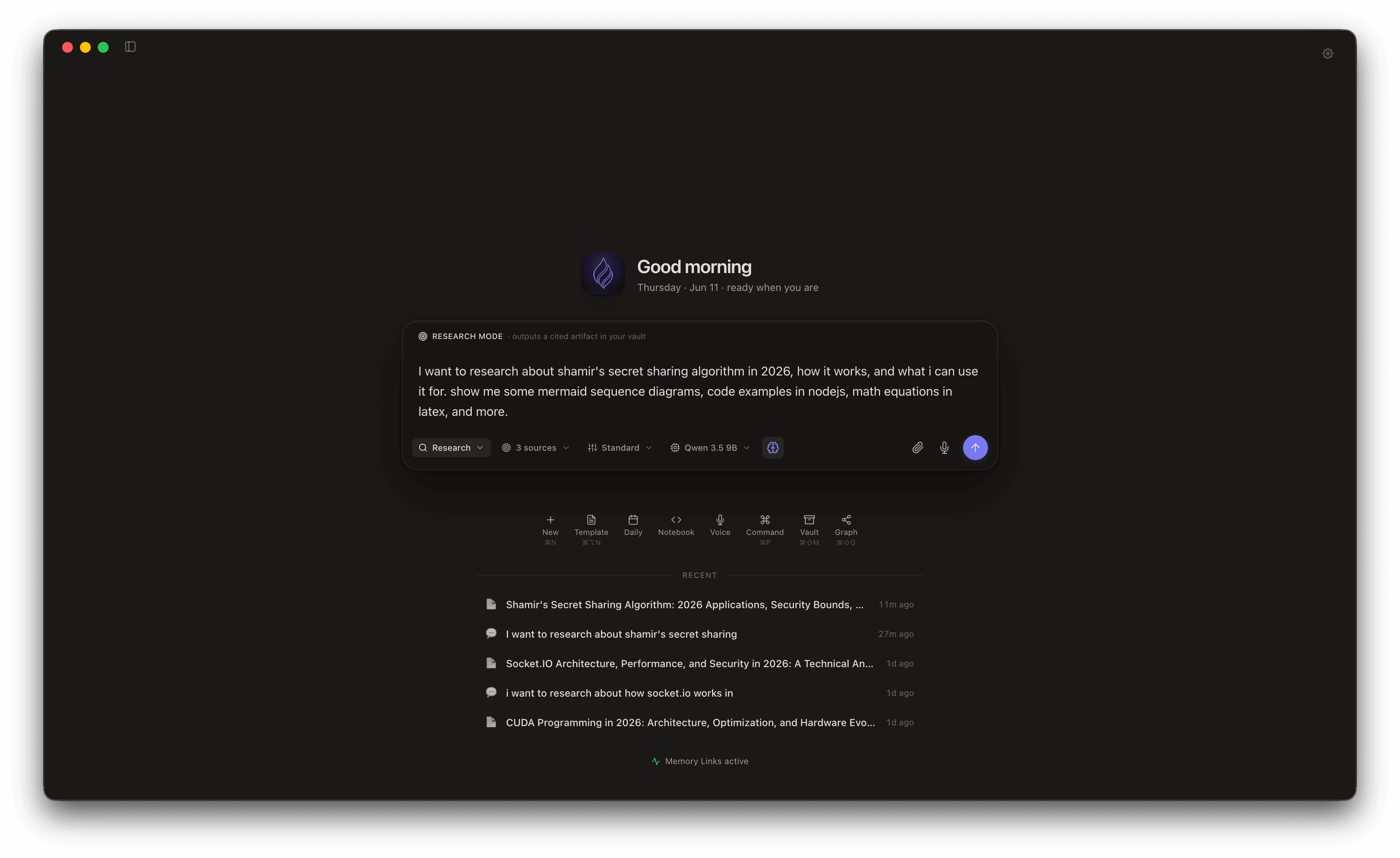
- Canto Chat is the new chat-first home introduced in v0.8.0. When you open Canto, you land in a chat composer that can answer across your entire vault, attached PDFs, audio, video, and the web — streaming back citations you can click. It pairs with Seamless Handoff: every citation [1][2] opens the source note in a companion pane, and you can promote any chat answer into a fresh draft note in one keystroke. Think of it as a private NotebookLM that runs on your Mac, with full read/write into your notes when you want it.
- One workspace, four surfaces. Canto Chat is for asking questions and exploring — your chat-first home. Notes are for writing and thinking — essays, research, knowledge bases with inline AI assistance. Notebooks are for code — Python, JavaScript, and TypeScript with instant execution and inline output. Canvases (new in v0.9.0) are for spatial thinking — an infinite whiteboard where you spread notes out and connect them. They share state: chat answers can hand off into notes, notes can be dropped onto a canvas, everything is cited back inside chat, and Memory Links connect it all by meaning.
- Canvas is a new first-class document type introduced in v0.9.0, sitting right beside notes and notebooks in the sidebar. Instead of a page of text, you get an infinite whiteboard: scroll to pan, pinch or ⌘/Ctrl+scroll to zoom, and spread your thinking out in two dimensions. Drop sticky notes, plain text, and shapes, plus two special nodes that link to your vault — note cards that open the real note in a click, and tag pills — then connect them with labeled edges that draw themselves in. The canvas also has its own docked AI agent: point it at a topic and it finds the relevant notes in your vault, lays them out, and draws labeled connections that explain how each pair relates, like “shared: Opus, Comparison” or “65% similar.” Built-in grid, radial, and force layouts tidy a messy board in one click, and like every other document a canvas supports full undo/redo, autosave, pins, folders, and Trash.
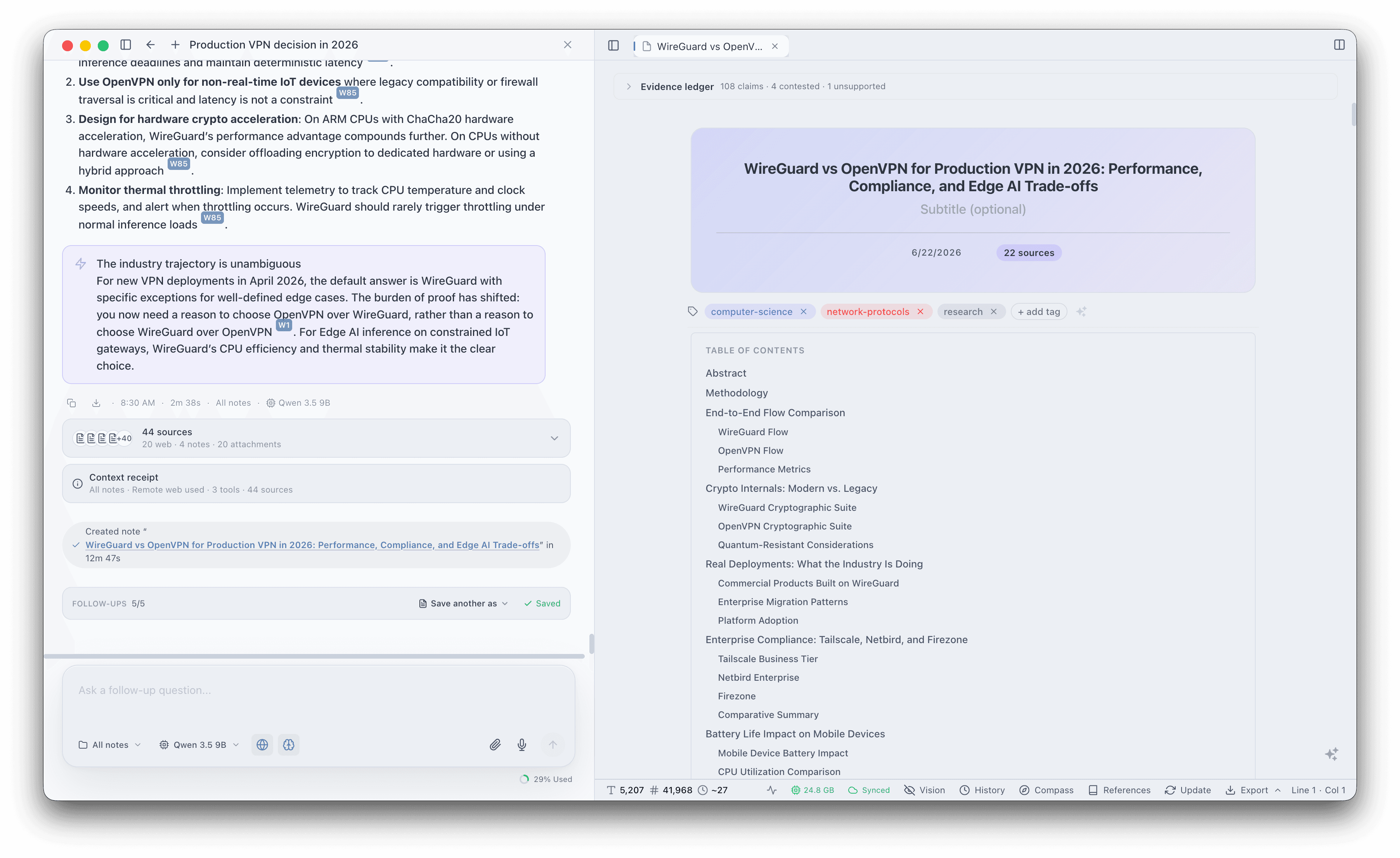
- Canto Research is a dedicated Research Mode inside Canto Chat, introduced in v0.8.3 and expanded in v0.8.4. Flip the Chat / Research switch and a normal question becomes a guided run: choose your sources (vault notes, Library files, the web, or a mix), pick how deep to go, and review an editable plan before any deep web work spends a credit. As it runs, a live source trail shows exactly what Canto is reading from your vault, Library, and the web. When it finishes, you save the result as a research note, brief, comparison matrix, or notebook — with a real table of contents, clean clickable citations, and a follow-up checklist Canto can work through one task at a time.
- Canto runs a native Python environment locally on your Mac — no WebAssembly, no cloud. Popular packages like numpy, pandas, and matplotlib install automatically when you import them. Variables are shared across Python, JavaScript, and TypeScript cells in the same notebook.
- Memory Links is Canto’s semantic linking system that automatically finds related notes as you write. Unlike manual tagging or keyword search, it uses AI embeddings to understand meaning — surfacing relevant insights from thousands of notes instantly, including code examples from your notebooks.
- Yes. After the first model download, Canto works completely offline. On planes, trains, or anywhere without internet — unlimited AI assistance, Memory Links, and semantic search are always available.
- Canto ships with 11 built-in local models, all Unsloth-hosted GGUF builds: Granite 4.1 3B (2.1 GB, default), Qwen 3.5 4B (2.9 GB), Gemma 4 E4B (5.1 GB), Qwen 3.5 9B (6.0 GB), Gemma 4 12B Unified (7.4 GB), GPT-OSS 20B (11.9 GB), GLM-4.7 Flash (17.5 GB, 30B MoE), Qwen 3.6 27B (17.6 GB), Qwen 3.6 35B A3B (22.4 GB), GPT-OSS 120B A5B (63 GB), and Qwen 3.5 122B A10B (77 GB). All support tool calling and run locally via Metal GPU acceleration, and the Qwen 3.5/3.6 and Gemma 4 builds add direct image (vision) input when their projector is downloaded. Larger multi-file models download in shards in parallel and resume cleanly if you cancel midway. You can also connect Ollama or LM Studio as external endpoints to use any additional model you’ve downloaded — including cloud-hosted providers like OpenAI and Anthropic through Ollama.
- Absolutely. Your notes, code, and Memory Links embeddings are stored locally in an AES-256 encrypted SQLite database. When you use iCloud Drive Sync, Canto writes encrypted sync data to your own iCloud Drive folder using a Sync Passphrase you choose. Canto does not upload readable note content to a Canto server.
- macOS 14 (Sonoma) or later. Requires Apple Silicon (M1 or later) for Metal GPU inference. 8 GB RAM is the minimum — enough for the default Granite 4.1 3B (2.1 GB) and Qwen 3.5 4B (2.9 GB). Enable Low Memory Mode in Settings to attempt larger models on smaller machines (may reduce context or cause instability). Recommended: 12–16 GB for Gemma 4 E4B and Qwen 3.5 9B, 16–24 GB for Gemma 4 12B and GPT-OSS 20B, 24–32 GB for GLM-4.7 Flash and Qwen 3.6 27B, 32–48 GB for Qwen 3.6 35B A3B, and 96 GB+ for the GPT-OSS 120B and Qwen 3.5 122B flagship MoE builds. Canto also cold-starts local models on demand, so the app stays light at launch even with a large model selected. Models download once and cache locally.
- Yes. Canto ships a built-in MCP Server that lets Claude Desktop, Cursor, Claude Code, Windsurf, OpenClaw, and any other Model Context Protocol client read and write your vault locally. Toggle it on in Settings → MCP Server. The server only accepts connections from your own Mac, an optional bearer token adds a second lock, and tools are split into always-on vault tools plus a separate opt-in automation dispatcher for scripted workflows. Per-tool approvals from your client still apply, so you stay in the loop.
- Yes. Canto includes a Safe Mode launch path designed for tight machines. If free memory is low at boot, or if the previous launch crashed before the window finished loading, Canto starts in a stripped-down mode where your notes, editor, search, and UI still work normally. AI extras are deferred until you say go, and Canto can suggest a smaller model if your last one was too large.
- The Memory dashboard and status bar aggregate Canto’s related processes, including heavier helpers like vision workers. The Memory modal can also break the total down by process so you can see which subsystem is using the most RAM. Canto also includes a “Reclaim now” button in Settings → Memory that drops idle weights and frees RAM on demand without restarting the app.
- Open Help → Send Diagnostics (also available from Settings → About). Canto assembles a redacted JSON bundle covering memory, AI runtime, updater state, database health, recent crash metadata, and (optionally) a screenshot and recent log excerpts. You see the full payload — with secrets and personal content scrubbed — before anything leaves your Mac, and can either save it locally for your own records or upload it directly to the LonelyDuck diagnostics endpoint. Renderer and helper-process crashes are captured locally so the next report can explain what actually happened.
- Canto is a one-time $29.99 purchase — not a subscription. The license activates on 1 Mac and includes lifetime updates within the current major version. Canto v0.9.0 replaces what people typically pay $120–$240 per year for across Notion AI, NotebookLM Plus, Reflect, or ChatGPT Plus. To view activated devices, deactivate an old Mac, or transfer your license, create a LonelyDuck account using the same email from your purchase receipt and open your Account Dashboard.
- Chat Recall lets Canto’s agent search and cite your past conversations using keyword search (FTS5), semantic embeddings, or both (hybrid). Past chats appear as [C#] citations you can click to open as tabs. Proactive chips surface related past chats above the composer. Per-chat opt-out and master toggle in Settings.
- Custom Agents unify personas, commands, and skills into one system. Personas set the tone (Companion, Critique, Researcher Pro) with tool allow/deny sets and model params. Commands are /trigger templates that expand into the composer for editing before send. Skills are multi-step workflows with a live preview of what comes next. All editable in Settings → Agents.
- Workspace lets you link external folders on your Mac. Canto indexes their contents semantically — PDFs, text, images, audio, video — and the agent searches your vault and linked folders in one query. Files stay in place; nothing is copied. Background indexing groups files by model resource to minimize swapping.
- Yes. As of v0.9.3, every product feature is available to free users — Canvas, Canto Chat, Research Mode, Inbox Mode, Agent Chat, Custom Agents, Workspace, Multi-Provider Web Search, @ Mentions, Memory Links, Live Transcription, and more. The only limit is 25 AI queries. Activation ($29.99 one-time) removes the query budget and enables offline AI.
- Tavily (all roles), Keiro (finder/reader, BYOK), SearXNG (finder, BYO URL), Serper (finder, BYOK), DuckDuckGo (finder, opt-in), and a built-in Chromium browser (reader + opt-in finder, key-free). Fusion mode fans out to multiple finders and merges results with Reciprocal Rank Fusion. The Chromium reader works out of the box with no API key.
Start free today.
Keep the note-taking app for free. Unlock the heavy AI workflows only when you actually want them.
Free forever for note-taking · 25 AI queries included · Unlimited AI for $29.99 one-time